Search & Win
Showing posts with label free. Show all posts

Thursday, July 9, 2009

Free Mochas Mondays from Mcdonalds

Yep you heard right, stop by any Mcdonalds starting the 13th of this month between 7 AM and 7 PM and get a free Mocha either hot or cold. This offer is good every Monday until August 3rd, so enjoy kiddies!

mochamondays


share on: facebook

Wednesday, May 20, 2009

Free Guitar Picks and Holder

Just simply go here and sign up. They should be delivered in 1-2 weeks. Then of course rock out. lolFender2


share on: facebook

Tuesday, April 28, 2009

A Different Approach to Desktops : Bumptop

If you’re tired of your same boring desktop, and i’m not talking about the wallpaper, i’m talking about the way the desktop is, the why not freshen it up with Bumptop.

Bumptop, basically transforms your desktop in a REAL desktop. In other words imagine you’re sitting at your desk were you can just throw stuff around and organize papers in piles, etc. Bumptop allows you to do exactly that. Watch the video and see what i mean.

If you like it, or want to give it a try just go here, to Bumptop.com


share on: facebook

Thursday, April 16, 2009

Finding good movies

Watching a good flick is hard these days, because lets face it, Hollywood comes out with so much filler movies, and sequels that seem catered to same mindless audience of teens that actually buy tickets to see these horrible movies. I dont have to go too far to mention the recent fast and the furious flick, its the number 1 movie this week, but the reviews are all rock bottom negative.

Sometimes they even take a semi good movie, like Transporter, and then make it into a franchise that is NOTHING like the first flick. Transporter 3 was one of the worst movies I have ever seen, I knew i wasn’t going to be oscar worthy, but at least maybe as half good as the first flick. But, i was horribly mistaken.

With busy schedules, its hard to sit down and actually watch something good, so instead of taking that risk i introduce JINNI. Jinni is a website that recommends movies that you like, based on your movie taste. I know there’s many sites out there that say the same thing, but I tested JINNI and it was spot on, actually recommending movies that I hold as some of my favorite.

You can browse movies based on what mood your in, maybe you want a funny romantic movie. Bingo- Jinni will tell ya. Or maybe you want a sincere, realistic, serious,fast paced, and little known movie…with Jinni you got it.

The demo video on their front page demonstrated with clarity what i mean, so what are you waiting for…. go to jinni now.


share on: facebook

Wednesday, April 1, 2009

Is it true or just an April Fool’s prank?

Supposedly a new worm virus that takes control of you computer was released a while ago, and today (april 1st) a mega computer will take control of all the pcs infected with such worm. For what? Well it could be, to steal the bandwidth of all these infected computers, or maybe to manipulate them into flooding a specific website. Imagine thousands of pcs going to the same site at exactly the same time…that will result in the site shutting down. Or maybe recording all the keystrokes on your pc…that means they would have access to your major passwords, and credit card numbers.

No one actually knows if this is true or just a prank. But, its better to be safe, than sorry, so here are links from major Anti-Virus companies that will eliminate this virus threat called Conficker.

Before I mention the links, to prove whether or not your pc is infected, try going to the following sites, Symantec, McAfee, and AVG. If you can access these sites, then you’re not infected, because this worm virus blocks off access to such sites. If you can’t, then here are the links for FREE programs that will remove this threat.

Eset's Win32/Conficker Worm Removal Tool
Symantec's W32.Downadup Removal Tool
McAfee's Stinger
Sophos' Conficker Cleanup Tool


share on: facebook

Monday, March 23, 2009

Change Your Boring Desktop Icons

Every now and then life is presented with some changes. The same applies to your desktop!! Aren’t you bored of l ooking at the same plain old desktop icons. Breathe new life into your desktop with these high quality icons. Want to make your desktop look like an iPhone? Or how about like if they were drawn by you? Origami??

All these are possibilites. So go ahead and click right here for a set of 50 free HIGH QUALITY ICONS.

You wont regret it.


share on: facebook

Monday, February 23, 2009

Free Quiznos Sub


Hungry? Here's a free Quizno sub, simply enter your info and you shold get a coupon via email.
nice deal!


share on: facebook

Wednesday, February 18, 2009

Free Collage Maker


If you have a bunch of digital photos, then you can make collages out of them with this program for free. You can make differente shapes, and even draw your own and the program will make a collage of the shape using the photos you give it. 

Just have a peek at the site and you'll see all the different ideas they have. Click here for Shape Collage

share on: facebook

Thursday, February 5, 2009

Fix Your Photos The Easy Way and for FREE


Took some pics recently?? Some of them came out kinda messed up, maybe not the right exposure, or color?? Want to fix them but lack the Photoshop skills?


Here's your solution, its called PhotoPerfect Express. It works fast, and its super easy to use.

Just install the program, and you'll see. It offers 3 ways (there's actually 5 but you have to pay for the other 2 or have the picture with a watermark) to fix your photo. You can simply click through them and test out each. Or press 1-3 on the keyboard. 0 (zero) if you want your original.

If you want to see all ways your photo can be fixed press A.  Once you think you found the perfect fix, just click on the bottom Save as to save your photo. Quick and simple. It will make more sense once you download it. ENJOY!!!

share on: facebook

Friday, January 30, 2009

Rename all Your Photos FAST and for FREE

Everyone has a digital camera now a days, and that means a mess when it comes to exporting the photos to your computer. Usually you get a folder full of photos that have the same name for example Sony models usually come out looking like this

DSC02745
DSC02746
DSC02748
DSC02749

etc..... 

So this starts turning into a problem especially if you want to be able to find photos quickly based on filename alone. Or if you want to better organize your photos here's the easy way how.

First of all download this program called ReNamer. Here's the link.

Once you you install it, open it, and follow these steps. 

1- We need to make a rule, or in other ways how the program is going to rename the files. In this example we're going to rename all the files to "Florida Trip" followed by a number sequence. (Florida Trip 0001, Florida Trip 0002, so on...) You of course can change "Florida Trip" to whatever it is you need.  CLICK where it says "Click Here To Add A Rule"  the following menu should appear 

2-Now Click on DELETE- since first we will want to Delete the the file name all the way to the extension (.jpg) so that we can make room for our new file name. Once you click Delete you should get several options. Under "From" it should stay as position: 1  , but just change "Until" and click on till end. Here's a pic to use as reference. After it loks like the pic click on ADD RULE.


3- Ok 1 rule down, 2 more to go. Now we'll add the new file name, in this case "Florida  Trip"
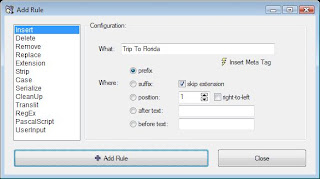
Click on the plus sign to ADD a new rule. It menu as the 1st pic should open again, its in "INSERT" just where we need it.  Where it says "What:", is where you would add the new file name. So I'll be putting "Florida Trip" in that space, MAKE SURE TO ADD AN EXTRA SPACE AFTER TRIP, OR AFTER WHATEVER FILE NAME YOU WILL BE PUTTING (so in reality it should be "Florida Trip " with the extra space after the "p"). Now a little further down it says "Where" click on prefix. Here's a picture reference. Click Add Rule when done.


4. -Now for the last time click on the plus Sign to "Add a new rule". This time click on "Serialize". Where it says "Where:" click on "suffix". And then on the bottom checkmark "Pad to length" and put a 4 next to it. Here's another picture reference. Click ADD RULE.


5- Now we're done with our rules. Now to select the files or folder you want to rename. Click on either "Add Files" or "Add Folders" right under File. Find the files that you want and they will load on the bottom half of the window. Now click on PREVIEW so that you can see how they will be renamed. Here's what mine would look like. 


If your happy with the results click on "RENAME" and you're done!

6 - Last but not least click on "Preset" on top. And then "Save As" so that you can save the set of rules you just created so that you can use it to rename other photos in the future. All you would have to do, is simple click on "Preset" and then "Load" and you should see your saved Rules. Of course you would have to edit the 2nd rule with a different file name to suit your needs. Just click click edit, and change the "What:" section and you'll be done. 

Hope this quick tutorial helps you out. 

share on: facebook

Wednesday, January 28, 2009

Wired Magazine

Wired is an excellent magazine with all sorts of information about various topics.

The latest one that i received is talking about the Truth about Cancer. Very interesting topic considering that most of us know, or has known of someone with cancer. The key is early detection, because if the cancer is detected in its first phase, the individual has a high chance of surviving. Yet if its late the survival rate drops more then 50%. 

The latests one mentions the GPS craze. Haven't read it yet, but looks interesting. I was going to provide a link for a free subscription to WIRED, but i think the offer expired so here's a link to another magazine

Heres a link to Motor Trend, for all those car fans out there. Just fill out THIS FORM, with your information and in 5 weeks around there you should start getting your first issue. These things work cause thats how i got my Wired Magazine. So click here.

share on: facebook

Tuesday, January 27, 2009

NIKE OFFER, 20% off items already on CLEARANCE and FREE SHIPPING


Anybody interested in buying some good old nike stuff, just visit this link right here
for the NIKE STORE


When you get to the NIKE STORE, just simply see what you want then add it to the card. At time for checkout when you fill out your name, address, etc. ON the bottome right corner you'll see space for PROMOTION CODES. Simply enter :

CLEAR2009 - and you'll get 20% off

and after enter:    

TRYAGAIN7 - and you'll get FREE SHIPPING

i just tried it on a pair of Jordans to see if it would work and it does, so get it while it lasts.

share on: facebook

Monday, January 26, 2009

Best FREE Firewall


I've tried out many solutions as a backup to the windows firewall, and I have found that Comodo Firewall is the best one. 

This program is not only FREE, but also packs a real time virus scanner, so if you're in need of both, then, there you go. 

The only recommendation i would suggest is to only use the firewall, and to turn off the DEFESEN+SECURITY as this could get annoying (too secure). Just install everything, and then once the program is on the bottom in the task bar, right-click on the shield icon. 

Select Defense+Security Level - then pick Disabled and there you have it. As a firewall it is flawless, asking you whether or not to permit a program to go online. This is very helpful because many viruses actually try to connect online in other to leak your information (bank accounts, passwords, conversations, etc.) or to allow someone else to take over your computer, in other words to hijack it. 

Almost everyone after Windows XP has the windows default firewall, but still it wouldn't be a bad idea to have COMODO as a back up. So go ahead and download it

share on: facebook

Sunday, January 25, 2009

3D Suberbowl

If you're plannign on watching the superbowl  on Feb. 1st, (Steelers vs. cardinals) then make sure to pick your 3d Glasses so that you can enjoy the halftime commericals.

There will be 2 commericails that will be in 3d,  one of the upcoming movie, MONSTERS VS. ALIENS, and another of the Sobe lizards that like to dance. 

You can pick up your 3d glasses in the local supermarket near the Sobe section. They're FREE so why not get some right?

share on: facebook

Friday, January 23, 2009

Save Money Free Ringtones

Dont spent $$$ for those 15-30 seconds of music for your cellphone, instead just make your own ringtone for FREE.


here you can make your own ringonte easily and for free. then when you're donw just send it to your phone, or download it to your pc so that you can put the song in a Mini SD card that most cellphones can read.

Simple and to the point.

share on: facebook

Wednesday, January 21, 2009

Free Desktop Capturing Device

Most everyone knows that if you press [print screen] that you can take a "photo", or a capture of your computer screen. Well but what if lets say you just wanted to capture a current open window, or maybe even capture stills of your video chat. Pressins [print screen] and then editing the photo takes time, thats why you could just simply use LIGHT SCREEN.

It lets you assign to what folder the programs takes this captures to, and what key combinations, or hotkeys activate it. It also runs fast, and its free. Download it here. 

share on: facebook

Free 3 Year Magazine Subscription

Anyone interested in Dieting and Staying healthy heres a 3 year subscription to 

Todays Diet & Nutrition

just click here in fill out the info


Act fast as this is soon to expire

share on: facebook
Search & Win