Search & Win
Showing posts with label tech. Show all posts

Friday, June 26, 2009

Pre-Order Windows 7 SPECIAL Price Today ONLY

9382697

Windows 7 is the follow up of Vista, which fixes alot of the complaints that users had with Vista. Windows 7 runs smoothly, even on netbooks that don’t have much power. Some users even say that it runs faster than XP. Today at midnight you’ll be able to pre-order Windows 7 from many website but i recommend the following:


Windows7-PII-4

Best Buy.com

Amazon.com

Walmart.com

Newegg.com


The Pre-order will be $50 for Windows 7 Home Premium Upgrade or $100 for Windows 7 Professional Upgrade. Home Premium is really what every one needs unless you work in tech support. This is an update so you will have to have a Xp or Vista already installed.

Windows 7 Home Premium Upgrade will go for $119.99  while Professional will be $199.99.

So this is a big saving. Especially if you buy it from Walmart using BING (Microsofts search engine that gives you cashback on your purchases). Bing will give you about 2-5% cash back on the walmart purchase and if i’m not mistaken also includes free shipping. Remember your copy will be arriving Oct.10.  

en-US219_Win_7_Windows_Flip_Glass


share on: facebook

Tuesday, April 28, 2009

A Different Approach to Desktops : Bumptop

If you’re tired of your same boring desktop, and i’m not talking about the wallpaper, i’m talking about the way the desktop is, the why not freshen it up with Bumptop.

Bumptop, basically transforms your desktop in a REAL desktop. In other words imagine you’re sitting at your desk were you can just throw stuff around and organize papers in piles, etc. Bumptop allows you to do exactly that. Watch the video and see what i mean.

If you like it, or want to give it a try just go here, to Bumptop.com


share on: facebook

Wednesday, April 1, 2009

Is it true or just an April Fool’s prank?

Supposedly a new worm virus that takes control of you computer was released a while ago, and today (april 1st) a mega computer will take control of all the pcs infected with such worm. For what? Well it could be, to steal the bandwidth of all these infected computers, or maybe to manipulate them into flooding a specific website. Imagine thousands of pcs going to the same site at exactly the same time…that will result in the site shutting down. Or maybe recording all the keystrokes on your pc…that means they would have access to your major passwords, and credit card numbers.

No one actually knows if this is true or just a prank. But, its better to be safe, than sorry, so here are links from major Anti-Virus companies that will eliminate this virus threat called Conficker.

Before I mention the links, to prove whether or not your pc is infected, try going to the following sites, Symantec, McAfee, and AVG. If you can access these sites, then you’re not infected, because this worm virus blocks off access to such sites. If you can’t, then here are the links for FREE programs that will remove this threat.

Eset's Win32/Conficker Worm Removal Tool
Symantec's W32.Downadup Removal Tool
McAfee's Stinger
Sophos' Conficker Cleanup Tool


share on: facebook

Thursday, March 26, 2009

Easy way to convert PNG to ICO – to make icons

I recently posted a link to many icons, but it turns out that some of these icons where in .png format, which is used by docks. Unfortunately this format doesn’t allow you to change your desktop icons, since they have to be .ico files.

Here’s the solution, download which ever icons you liked, and simply convert them here for free. Convert ICO, allows you simply upload the PNG file and convert it to ICO so that you can apply it as a desktop icon. Nice and simple, so what are you waiting for, change those boring desktop icons. Click here to go to Convert ICO.


share on: facebook

Monday, March 23, 2009

Change Your Boring Desktop Icons

Every now and then life is presented with some changes. The same applies to your desktop!! Aren’t you bored of l ooking at the same plain old desktop icons. Breathe new life into your desktop with these high quality icons. Want to make your desktop look like an iPhone? Or how about like if they were drawn by you? Origami??

All these are possibilites. So go ahead and click right here for a set of 50 free HIGH QUALITY ICONS.

You wont regret it.


share on: facebook

Wednesday, February 18, 2009

G2 Announced for T-Mobile


The second version of Googles Phone was announced yesterday. It is rumored to be released mid-May of this year. Its much smaller than the G1 and faster, but lacks the physical keyboard. It seems that with this hardware, Android, Googles platform, really shines and you can see just how fast and easy it is to use. Looks like May is going to be an interesting month.


share on: facebook

Free Collage Maker


If you have a bunch of digital photos, then you can make collages out of them with this program for free. You can make differente shapes, and even draw your own and the program will make a collage of the shape using the photos you give it. 

Just have a peek at the site and you'll see all the different ideas they have. Click here for Shape Collage

share on: facebook

Special Deals!!!

SanDisk® Cruzer® Micro 8GB ReadyBoost™ USB 2.0 Drive With U3 Software -$14.99(regularly $44.99)


share on: facebook

Friday, February 13, 2009

Download ANY video from Youtube as a MP3

Well last post i explained how to download a video from YouTube as a file so that you can watch it on your pc, or put in on your ipod or a dvd. Now what we're going to focus on is how to save videos as MP3s.

Its very simple, you copy the link of the video you're on and then head on over to Listen To Youtube and just paste the link there. That site should convert it to an MP3 and save it on your pc.

Of course if you want to skip using the site...then here's the GreaseMonkey code that you can download. Enjoy!!

share on: facebook

Thursday, February 12, 2009

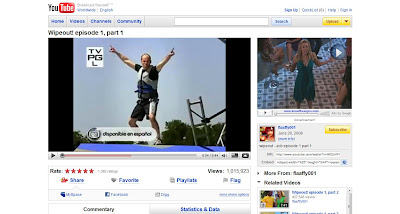
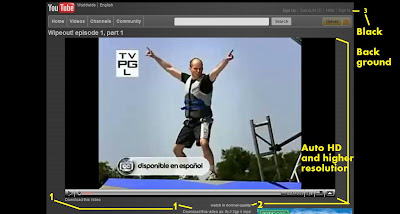
How To Add Download Links, Auto HD Video, and Black Background to YOUTUBE

Everyone uses youtube, whether its to see the latest basketball play everyone is talking about, movie trailer, funny/stupid clip that people film, or even the latest episode of your favorite tv show. With this tutorial you'll make youtube that much better. Well discuss:


1- How to add Download Links for videos- to save in .flv, .3gp, or .mp4 (for ipods)

2- How to make Youtube play the HD version of the video automatically.

3- How to make Youtube's background black to make it easier on the eyes. 

(click to enlarge)

If you like these changes, then lets get started. Estimated Time: 5 minutes

1- First, download and install Firefox(FF) web browser. Click Here

2-Once thats done with download GreaseMonkey which is an extension for FF. Click Here 
Greasemonkey allows you to run scripts that make websites act differently. When its installed you should see a monkey on the right hand corner of FF. So once its install now you need to download the script.

3- This script will give you the download options and also higher resolution video. It does have one annoying feature (at least in my opinion), which is looping of videos, but don't worry we can change that easily. Here's the script. Click install on the right.

4- Once installed go to any youtube video and you should see the changes I mentioned. If you're satisfied and don't want the black background you can stop here and jump to step 9 if you want to fix the looping of videos. If not then, thanks for reading and I hope you enjoy your new youtube.

5- To get the black background, we have to install another addon called Stylish for FF. Click here

6- Once installed you should see the following on your right hand corner in FF. (click to enlarge)


7- Now go to www.youtube.com

8- Now click on stylish and a menu should pop up. Select "Find Styles for this Page"
This should open up another tab, where you will find many different styles for Youtube. The one that i'm using to make mine black is called aByte: another Black YouTube Embodiment. Find it on the list or simply click here . Scroll to the bottom and click Load Into Stylish. And thats it!!

So now you have YouTube ready to watch and download as you please. THANKS FOR READING!!


Now.. if you do not like the fact that the video loops at the end because of the Greasemonkey video, like I didn't, here is the quick fix.

9- Right-Click on Greasemonkey and Manage User Script. A window should pop up. On the left hand panel, select Youtube HQ +720p Ultimate.... Now on the bottome left hand corner click on Edit. It should ask you to pick what program to edit the script with. Find and select notepad.
It should be in your Windows directory. (ex. C:\windows\notepad.exe) Click ok and it should open up.

10-  You should get the following window. The line that we need to fix is is titled "loop" (look at the picture for reference) (click to enlarge)


11- Save it and you're done. No more looping at the end of the video!

If you have any questions or some part of this tutorial is not clear, please leave a comment, and I'll answer it. Thanks for reading!!


share on: facebook

Wednesday, February 11, 2009

Random Links In Case You're Bored Feb.11 2009

Here's a link to a free self defense video. I laughed.  Self Defense Video


Some were getting negative with Google G1 phone, because of lack of mulitouch. A couple of days ago it was hacked to allow, meaning in other words... it can be done. The phone is capable of doing it. See video here. So why didn't Google include it???? Becaue Apple asked them not to. Full Article


Kid bought $37,000 worth in candy....and charged the bill to his former school. Full Article
Just plain stooge-like behavior right there!


How one guy switch form Iphone to Google's Android (G1). Full Article


share on: facebook

Thursday, February 5, 2009

Fix Your Photos The Easy Way and for FREE


Took some pics recently?? Some of them came out kinda messed up, maybe not the right exposure, or color?? Want to fix them but lack the Photoshop skills?


Here's your solution, its called PhotoPerfect Express. It works fast, and its super easy to use.

Just install the program, and you'll see. It offers 3 ways (there's actually 5 but you have to pay for the other 2 or have the picture with a watermark) to fix your photo. You can simply click through them and test out each. Or press 1-3 on the keyboard. 0 (zero) if you want your original.

If you want to see all ways your photo can be fixed press A.  Once you think you found the perfect fix, just click on the bottom Save as to save your photo. Quick and simple. It will make more sense once you download it. ENJOY!!!

share on: facebook

Finding Wallpapers that fit EXACTLY

Here's a neat trick. If you want to find a wallpaper using google, but are tired of getting those that don't fit your screen exactly so they look ugly, then just use this simple command in google.

imagesize:(your resolution)(keyword)   and press enter, and search for images. For example


imagesize:1280x800 sky       If i'm looking for a wallpaper of the SKY thats 1280x800
or
imagesize:1024x768 dark knight     To find wallpapers of DARK KNIGHT that fits 1024x768


If you're not sure of your resolution just right-click anywhere on your desktop and select Display Properties where you shold find your resolution.  Or simply click here on WHAT IS MY RESOLUTION. This website will tell you, your resolution. 

share on: facebook

Friday, January 16, 2009

Windows 7 - File in Use

You know those times that you want to erase or move a file, or maybe eject a USb drive, yet windows wont let you, and you are completely clueless why? Well aparentely, gone are those days, we at least if you have Windows 7

Windows 7 will actually let you know why the specific file  can't be erased or closed. Pretty neat trick. Simple stuff like that is what we need to make the user interface more userfriendly.

Can't wait for WINDOWS 7!!

share on: facebook

Aim, Yahoo, Windows Live Messenger Slowing You Down

Now a days, we all have to use some sort of program to chat and stay in touch with out friends. 
But there are 2 problems...

1- Each of these instant messaging clients take up valuable pc power, which really slows us down.
Some of these really hog ram which make our pcs run slowwwww.

2- Our friends are spread across different clients, some have yahoo, others aim..etc. So we have to sometimes end up using more than one program to say in touch with all of them.

The solution is meebo.

Simply go to www.meebo.com and sign in from there. Its inside you're web browser so it doesn't take up that much memory. You can even create a meebo account that will sign you in to ALL your IM clients at the same time. 

Meebo also saves you're conversations for you just in case you want to read something later on. Real nice. So go ahead and give it a try...

share on: facebook

Load MP3s fast!!

Sometimes you just download a new song, and you just really want to give it a hear...so you double click on it and it takes foreverrrrrrrr(well maybe not forever but pretty close lol) for itunes to open up the song. Have you had that happen to you??

Well fear no more, just use foobar to open the song and you'll be hearing it in under 4 seconds.
Its extremely fast, and very simple to use. foobar can even be custimized any many different ways.

heres the link for those interested:http://www.foobar2000.org/?page=Download

by the way, once you do download, make sure that you change the default programs for handling mp3s to foobar, so that when you do click on a mp3 foobar opens it.

share on: facebook

3dMark06

3dmark06 is a program that tests out your computers graphical power. Let's say that you're updating drivers for your graphics card, and you want to see if it was worth your time up changing from 169.04 to 169.09. 

What you would do is simply run 3dmark06. It consists of a couple of tests. It takes about 5-10 mins, and at the end it will give you a rating. So what you can do is simply compare ratings and PRESTO you'll see if it was worth it.

Here's the link for those interested http://www.futuremark.com/benchmarks/3dmark06/download/

the file is about 580mb and it takes up about 1 gig of hd once installed.

share on: facebook
Search & Win